mantis CLI works with a Mantis server and the stateless
edge worker. The
command map
shows how the commands fit together.
New to the CLI? Run mantis init for guided, interactive setup, or mantis
with no arguments for a context-aware welcome screen.
This reference covers the published CLI v0.3.0. The
terminal output redesign is
available when you build from
main. Check your version with
mantis --version and run mantis doctor after upgrading the server.Terminal output on main
mantis --help groups commands by task. The welcome screen shows next steps
for the server and edge setups it finds. Diagnostics in mantis doctor
distinguish failed checks from skipped checks and show recovery commands where
available.
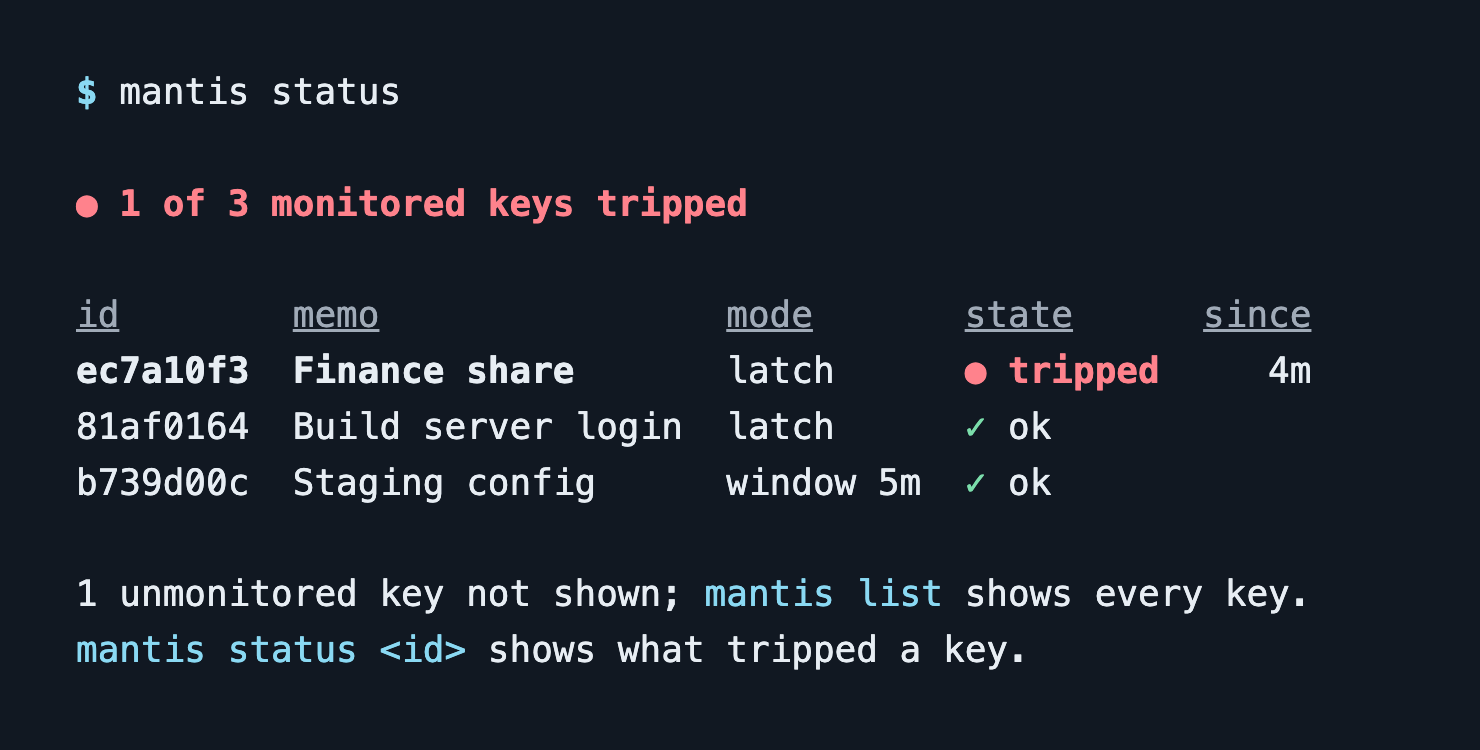
mantis status puts tripped monitors first. In this example, Finance share
tripped four minutes ago. Run mantis status ec7a10f3 to see what tripped it.
 For scripts, choose
--json or the command’s --id-only or --url-only flag
where available. Use --color never and MANTIS_ASCII=1 when your terminal
needs plain text and ASCII symbols.
Global flags
These can be combined with most commands. They’re owned by the rootmantis
program, so they work the same everywhere.
Environment-only settings
Three settings have no flag — they only exist as environment variables.How a command picks its server
Resolution happens when the command runs, in this order:- Ad-hoc —
--base-url+--keytogether talk to a one-off server, ignoring profiles. --profile <name>— use that named profile.MANTIS_PROFILE— same, from the environment.- Stored current profile — the default when nothing else is set.
Any
<id> argument accepts a full UUID, a unique prefix of at least four hex
characters, or the literal last (the most-recently-created key). Example:
mantis hits last --follow.Setup & authentication
mantis init
Guided first-time setup — walks you through a server or edge configuration,
interactive. No flags.
mantis login
Store an API key for a profile, creating one if needed.
mantis logout
Clear stored credentials for a profile (default: current).
mantis whoami
Show the current profile: server, key prefix, Cloudflare Access state, and edge
worker. No flags.
mantis doctor
Check CLI config, server health, auth, and split public/private hosts.
mantis detect
Scan this machine for Mantis-style installer artifacts — a defensive,
offline self-audit.
Profiles
mantis profile <subcommand> — manage CLI profiles (multiple Mantis servers +
edge workers).
profile set-edge links a default mantis-edge worker URL to a profile, which
mantis edge mint then uses as its fallback worker.
Cloudflare Access
mantis cloudflare <subcommand> — manage Cloudflare Access auth for the Mantis
API. See Cloudflare deployment for context.
These commands act on the profile chosen with the global
--profile flag
(default: the current profile), and login and set-service-auth print the
target profile and server before anything is stored. --base-url is rejected
here, because Access settings belong to a profile.
set-service-auth configures a Service-Auth client-id + client-secret pair for
headless CLI usage.
Keys
mantis new [memo]
Create a new key, and optionally generate bait artifacts and an installer in one
shot. [memo] is a human-readable label.
Bait-file artifacts (each writes a file containing the canary):
Installer chaining (template a host snippet right after creation):
Run
mantis new with no arguments on a TTY to launch the interactive wizard.
mantis bulk-create (alias import-csv)
Bulk-create keys from a CSV and write an output CSV with the generated URLs.
The input CSV is capped at 64 MiB. Raise it with
MANTIS_BULK_CREATE_MAX_BYTES if you trust the
file.
Per-row CSV columns. The flags above set one value for every row. To vary a
row from the rest, add these columns to the input CSV. response_kind,
response_payload, and expires_at override the matching flag for that row only;
the notify / notify_<channel> columns add their destinations on top of the
--notify flags rather than replacing them:
Output columns. The output CSV is your input with six columns appended
(reused in place if a same-named column already exists, matched
case-insensitively):
mantis_memo, mantis_id, mantis_public_id,
mantis_url, mantis_created_at, and mantis_error (populated per row on
failure, so a partial run tells you exactly which rows didn’t create).
mantis list (alias ls)
List keys.
mantis show <id>
Show one key.
mantis last
Print the id of the key this API key created most recently. (Or pass last as
the <id> argument on any command.) Keys created in the dashboard or with
another API key are not considered. Commands that act on a key print which key
last or an id prefix resolved to before they do anything. No flags.
mantis open [id]
Open a key’s dashboard page in the browser (or the dashboard root).
mantis disable <id...>
Disable one or more keys (preserves hit history). Accepts multiple ids. No flags.
mantis enable <id...>
Re-enable one or more disabled keys. Accepts multiple ids. No flags.
mantis rm <id...> (alias delete)
Delete one or more keys and cascade their hits. Accepts multiple ids.
Artifacts & installers
mantis download <id>
Download generated bait files for an existing key. Each flag writes one file.
The last eight are the credential/config-store bait formats: unlike the document
formats above (
--rtf included, which beacons on open like .docx), they fire
when the URL inside is used, not when the file is opened. Save each under the name the real thing has (cookies.txt, .netrc,
~/.aws/credentials, …) — see file keys.
mantis install <id>
Generate a host-install or web-embed snippet for a key (built-in or
plugin-provided type). See Host events.
Installer types
Plugins can register additional types;
mantis install validates against the
union of built-ins plus installed plugins.
Device suites
mantis device <subcommand> — mint and install the full set of host alarms for
one machine in a single step. Where mantis new --install templates one alarm,
a device suite mints one key per vector (shell login, sudo, wake, boot,
network) for a named machine, so a hit tells you which alarm fired rather than
just “something happened on web01”. Each key is keyed idempotently by
device-name + vector, so re-running for a rebuilt machine reuses its keys instead
of minting a second set.
mantis device profiles
List the vectors each OS profile would mint (and which need extra setup). No flags.
mantis device new
Mint one key per host alarm for a machine.
--bundle is the reversible option — you read the script before running it;
--install is the apply-now shortcut for the machine you’re on.
Re-running device new for the same machine reuses its keys. It refuses to arm
a reused key that another API key created, or that is disabled or set to
expire, and says which key that is.
Run the bundle’s install.sh as the account you want watched; it asks for
sudo itself where an alarm needs root. Run with sudo, it installs the
per-user alarms for the account that called sudo (on macOS, failing that, the
user at the console). On Linux a direct root login installs them for root. Set
MANTIS_TARGET_USER=<name> to choose. install.ps1 exits non-zero if any
scheduled task fails to register.
Hits & monitoring
mantis hits <id>
Show recent hits for a key (filterable; --follow for a live tail).
mantis watch [id]
Poll for new hits and print them as they arrive — across all keys, or one.
Omit [id] to watch all keys.
mantis status [id]
Show monitor state across keys, or details for one (window mode: hits + expiry;
latch mode: hits since reset). Omit [id] for a summary across all monitored keys.
mantis monitor <id>
Configure the Uptime Kuma status endpoint for a key.
mantis reset <id>
Reset a key’s tripped monitor state (latch mode). No flags.
Notifications
mantis destinations <subcommand> (alias dest) — incrementally manage
notification destinations on a key. Channels: webhook, email, slack,
discord, teams, home_assistant.
addfires an activation ping when the destination is created.testfires a synthetic hit on the key URL and reports which destinations succeeded. It is a real hit: it trips an enabled monitor and starts the key’s dedupe window.rotate-secretrotates the HMAC signing secret on a webhook destination; the new secret is shown once.
/settings/notifications (admin
only) — see global destinations.
There is no CLI subcommand for the global set.
Audit log
mantis audit log — list audit events, most recent first (admin keys only).
Edge worker
mantis edge <subcommand> — manage the stateless mantis-edge (Cloudflare
Worker) key flow. See Edge deployment.
mantis edge keygen
Generate a 32-byte AES key for an edge worker (prints to stdout). No flags.
mantis edge deploy
Deploy the mantis-edge Worker (wraps wrangler deploy) and capture its URL.
Runs the worker’s own wrangler via npx, so no global install is needed.
mantis edge set-key [worker] [key]
Store an edge AES key in the OS keychain for a given worker URL. [worker] is
an alternative to --worker; [key] is a base64url-encoded 32-byte key
(prompts for paste if omitted).
There is intentionally no
--key flag here — it would collide with the global
--key. Use the positional argument, --key-stdin, or the prompt.
mantis edge delete-key
Remove a stored edge key for a worker URL.
mantis edge mint
Mint a stateless edge URL — no server round-trip, pure local crypto. Run it bare
on a TTY to launch the interactive wizard.
--edge-key is named separately from the global --key to avoid a collision.
mantis edge device
The stateless counterpart to mantis device new: mint one
edge URL per host alarm for a machine and write an install bundle directory,
with no server and no database. Same vector model as mantis device, plus the
edge minting flags.
mantis edge install <url>
Generate an installer snippet for a stateless edge URL — the same snippets
mantis install produces server-side, but for a minted edge URL. <url> is the
URL printed by mantis edge mint.
Backup & restore
mantis backup and mantis restore export and re-import your CLI profiles +
plugin manifest as a passphrase-encrypted file. These have a dedicated guide
with format details and automation examples — see
CLI backup & restore.
mantis backup
mantis restore <file>
<file> is a bundle produced by mantis backup.
Plugins
mantis plugin <subcommand> — manage CLI plugins (third-party installer types +
file formats; installed locally, never on the server).
Machine-wide config
mantis config <subcommand> — get/set machine-wide CLI defaults (output mode,
color). Stored defaults are applied below explicit flags.
Shell completion
mantis completion <shell> — print a shell completion script. <shell> is
bash, zsh, or fish.
Related
- CLI backup & restore — passphrase-encrypted profile + plugin export
- HTTP API — the JSON API the CLI wraps
- Configuration — server-side environment variables
- Updating — keeping the server, CLI, and edge worker in sync
- Host events and Edge deployment — what the installers and edge URLs do